Friday, February 26, 2016

Recurring Deposits – How to get maximum benefit from them in your financial life !

Today I will talk about the simplest financial product known to me – the Recurring Deposit or RD as it is called. Most investors know about Recurring Deposits and have used them at some point of time. However, many investors are still confused regarding this straightforward product.
Also, I will share tips on extracting the maximum benefit out of Recurring Deposits and on using this product to lead a better financial life. (Even our upcoming investors bootcamp will help you lead a better financial life).
Recurring Deposits

Simple and Beautiful financial Product

Recurring Deposits are often rightfully called one of the simplest financial products in the world. You open a Recurring Deposit for a fixed amount and for a fixed tenure. Each month that fixed amount is invested and you earn interest (at a predefined rate) on the Recurring Deposit.
For example – You can open a Rs. 1,000 Recurring Deposit for 2 years @ 9% interest. Now for the next 24 months, Rs. 1,000 will be invested from your bank account and it will get accumulated in the Recurring Deposit and will accrue interest at the rate that was offered. This is exactly the same as putting Rs. 1,000 in a piggy bank on a certain date for the next 2 years, except that in Recurring Deposit you also get interest income (which is not an option with the piggy bank).
I have been unequivocal in stating that almost all new investors who enter the world of personal finance should start with Recurring Deposits. Typically, new investors do not fully understand the principles behind personal finance and so to protect their money from the they leave funds dormant in their savings account or use them up for some other purpose. Instead, by creating a Recurring Deposit, they will ensure their income is getting channeled into investments and more importantly that they earn interest on their money – eventually leading to good investing habits being formed. Gradually over the next 1-2 years, they can start investing in other instruments such as mutual funds, real estate or bonds.

Planning your Short Term Goals using Recurring Deposits

A Recurring Deposit is a safe investment, or in other words, it is a financial product with guaranteed returns. Stocks or mutual funds are not ideal investments for short tenures. There isno guaranteed return in equity-based productsand consistent returns can only be expected over a long horizon of 8-10 years.
Recurring deposits are therefore the ideal products to consider when planning short-term goals over a horizon of 1-3 yrs. These may include
  • A corpus for a downpayment of our new home
  • Education fees for your children (yearly fees paid in one shot)
  • Home Renovation expenses
  • Higher Education Expenses if you are in Job
  • Upcoming Marriage expenses due in 2-3 years (e.g. sister’s/brother’s marriage)
  • Setting aside funds for a vacation
Now if you look at most of these goals above, Recurring Deposits give returns similar to those of Fixed Deposits. Returns are at the moment in the range of 8-10% depending on the tenure chosen. As Recurring Deposits do not carry risk, they are the ideal investment solution for short-term goals (such as the ones above) where the investor is looking for guaranteed and liquid returns on savings.

Using Recurring Deposits for Ultra Short term goals in life

But the real reason why I love Recurring Deposits the most is this – Recurring Deposits are without doubt, the most powerful way to reach your ultra short-term goals in life. The parts below are excerpted from my 2nd book – “How to be your own financial planner in 10 steps“.
How many long-term financial goals do you have in life – A maximum of 3 or 4, right? Investors tend to overemphasize their focus on this handful of goals in life and spend most of their time working towards them. However most of these goals are so distant in the future, that planning for them is virtually impossible. On the other hand, we have dozens of small goals in life, which are due in next 6 or 8 months or a year at the most. We really aspire to achieve these goals, but ironically, never plan for them – because we think they can be achieved without planning.
Let me explain -
Imagine you want to buy Nokia ‘Lumia 720’ in the coming 6 months. This is very small goal. But most people think about it and leave it hoping to have sufficient money for the phone when the time comes. Now imagine 8 months go by. If at that time, the person has enough money in his account, the idea to buy the phone will again occur to him and he will make the purchase. And if the money is not there, the purchase idea yet again gets pushed out in to the future.
The same habit recurs in a case where you might wish to gift a small vacation to your parents on their birthday next year. Lets say you want to send your parents on a small vacation after a year, and it would cost Rs. 25,000. Now again no one “plans” for it. The matter of having sufficient funds when the time comes is left to chance.
Now here comes the power of Recurring Deposits where you convert each ‘small expenditure’ that is due in the next 6 months to 2 years (not more than this please) into a goal – and open a Recurring Deposit for it. You then let the money flow out of your bank account each month without manually getting involved, set reminders for each goal on the target date and keep achieving those goals!
Example of using Recurring Deposits in a Scenario
Imagine you have 3 small goals within next 1.5 years and those are
  • Buy Nokia Lumia 720 in next 10 months – Rs 20,000
  • Gift a Vacation to Parents in next 1 yr – Rs 25,000
  • Pay Installment of you Kid Pre-school in next 1 yr – Rs 25,000
Most people have goals similar to the ones listed above. To achieve these goals, you can open 3 Recurring Deposits (one for each of these), for the exact tenure (10 months, 1 year and 1.5 years). Consequently, just by having small investments each month, your planning for short-term goals will become quite robust. As the deposits mature, you will find that you have the financial means to achieve your goals without scrabbling to arrange money at the last moment or worse, having to drop your goals altogether.
Taking the above example, The RD’s would be like this
  • Buy Phone – Start 10 months RD for Rs 2,000
  • Gifting Vacation – Start 1 yr RD for Rs 2,000
  • Pre-school Fees – Start 1 yr RD for Rs 2,000
  • Total Money going in RD each month – Rs 6,000
What you have done above is to give concrete shape to your short- term goals by using Recurring Deposits and prevent your goals from turning into perennially postponed wishes or wishes that remain unfulfilled throughout your life.
Simplicity means Fast Action
Setting up a Recurring Deposit is so easy it’s almost effortless. You can log onto your Internet-banking page and open an online Recurring Deposit within seconds. You just have to pick the amount per month, the tenure and the date you want the money to be debited from your bank account – and your Recurring Deposit is all set. This simplicity in setting up also helps you take actions faster
Recurring Deposits Tenure’s and minimum Requirement
The minimum and maximum tenure and amount for recurring deposits varies from one bank to the other. In general, PSU banks such as SBI Bank, PNB or Andhra Bank have a minimum limit of Rs. 100 to open a recurring deposit. However, private banks such as ICICI, HDFC or Axis have minimum limits of Rs. 500 or Rs. 1000. The maximum tenure for Recurring Deposits is up to 10 yrs. Here is a snapshot just to give you an idea
Recurring deposits tenure and limits
Some other Features of Recurring Deposits
  • There is no TDS applicable on recurring deposits, but the interest income is fully taxable in your hands.
  • You can break your recurring deposits anytime before maturity with some penal interest. The interest applicable will be the rates applicable for the tenure RD was running and not the original tenure chosen.
  • Some Banks offer flexi recurring deposits also, where you can increase the amount of deposit each month (but cant decrease it)
  • The minimum tenure for RD is 6 months and maximum is 10 yrs
  • You can start recurring deposits for minimum of Rs 500 or Rs 1,000 . In post office its minimum Rs 10
  • Recurring deposits comes with Nomination Facility, so your nominee will be contacted and handed over the money if you die.
  • You can take loans against your recurring deposits for 80-90% of RD worth
  • Interest is compounded on quarterly basis in recurring deposits
Please share what you think about Recurring Deposits. Have you used them? Can you share one insight or hidden information about Recurring Deposits, which you feel may help others!


Android Apk
Read More..

Friendcaster apk Latest Version

Friendcaster apk
Friendcaster apk

Current Version : 5.3.3.2
Requires Android : 1.6 and up
Category : Social
Size : 5.1M

Original Post From http://apkandroiddownloads.blogspot.com


Friendcaster apk Description

Friendcaster sports a beautiful interface, loads of features and push notifications.

If features are what you're after, we've got em:
★ Push notifications
★ Full news feed
★ Comment, post and like comments
★ 6 beautiful themes
★ Quick access to posting status updates, photos and video
★ Quick access to checkins
★ Beautiful checkin map of all your nearby friend's locations
★ Easily view your news feed based on your friend lists
★ Displays your full size cover photo on the app opening screen
★ Support for multiple accounts
★ Hi-res photos directly in the news feed
★ Quick and easy setup assistant for notifications
★ Designed specifically for Android and Ice Cream Sandwich

Keep up with friends and family with Friendcaster.


Friendcaster apk Videos and Images


Visit us on http://apkandroiddownloads.blogspot.com

download


Android Apk
Read More..

Wednesday, February 24, 2016

Cara Membuat Sony Stock FTF ROM Menggunakan PC Companion

Trik Membuat Sony Stock FTF ROM Menggunakan PC Companion
Trik Membuat Sony Stock FTF ROM Menggunakan PC Companion | Untuk pengguna Xperia, dianjurkan bahwa mereka harus memiliki Sony Stock FTF ROM untuk perangkat mereka. Stock FTF ROM adalah hal yang akan membantu Anda jika ada yang tidak beres saat proses upgrade atau rooting perangkat Android. Perangkat kadang bisa stucked dalam animasi booting yang tak terbatas atau telepon Anda mungkin tidak merespon jika Anda sudah mendapat hardbrick. Sangat mengerikan bukan? Maka dari itu jika sebelumnya anda sudah memiliki Stock FTF ROM, semua masalah diatas bisa diatasi dengan mudah.

Sony Stock FTF ROM untuk perangkat Anda dapat ditemukan di internet di berbagai situs. Anda bisa men-download dan flash telepon Anda dengan mereka. Tapi tunggu dulu, apakah Anda yakin bahwa Stock  FTF ROM yang Anda gunakan aman dan malah akan membahayakan perangkat Anda?. Kadang-kadang beberapa hacker demi mencuri informasi Anda, mereka menyisipkan beberapa kode dalam file Stock ROM  FTF yang mengirimkan informasi pribadi Anda ke pengubah nya setiap kali Anda terhubung ke internet. Jadi solusinya adalah dengan membuat salinan sendiri dari Sony Stock FTF ROM untuk perangkat Anda. Bagaimanapun. Itu sebabnya, hari ini saya di sini untuk berbagi sebuah trik  dengan Anda untuk membuat file Sony Stock FTF ROM menggunakan PC Companion dan Flashtool.

Trik Untuk Membuat Sony Stock FTF ROM Menggunakan PC Companion

Sebelum Anda bergerak maju ke langkah-langkah, periksa apakah Anda memiliki semua bahan yang diperlukan atau tidak.
  1. Koneksi internet dengan kecepatan tinggi.
  2. Sony PC Companion.
  3. Flashtool.
  4. Kabel USB Sony asli atau jika tidak punya anda dapat menggunakan kabel USB lainnya yang berkualitas baik.

Membuat Sony Stock FTF ROM Menggunakan PC Companion

  1. Instal dan buka Sony PC Companion.

  2. Trik Membuat Sony Stock FTF ROM Menggunakan PC Companion

  3. Sekarang klik pada Support Zone. Ini akan mulai men-download antarmuka Support Zone.
    3. Pada layar ini Anda akan melihat berbagai pilihan seperti Telepon / Tablet Update, pembaruan perangkat lunak Aksesoris, dan Recycle ponsel / tablet dll. Sekarang menghubungkan ponsel Anda dengan menggunakan kabel USB.

  4. Trik Membuat Sony Stock FTF ROM Menggunakan PC Companion

  5. Sekarang klik pada tombol Start di bawah Telepon / kolom Tablet Update. Ini akan membuka jendela pop-up.

  6. Trik Membuat Sony Stock FTF ROM Menggunakan PC Companion

  7. Jika ponsel Anda perlu diperbarui kemudian klik pada tombol Perbarui lain klik "repair my phone/tablet".

  8. Trik Membuat Sony Stock FTF ROM Menggunakan PC Companion
    Trik Membuat Sony Stock FTF ROM Menggunakan PC Companion

    Catatan: Hati-hati, itu akan menghapus semua data pribadi Anda.
  9. Sekarang sebelum inisialisasi, ia akan meminta Anda "Apakah Anda ingin memutuskan hubungan telepon selama proses ini?". Klik tombol Yes.

  10. Trik Membuat Sony Stock FTF ROM Menggunakan PC Companion

    Trik Membuat Sony Stock FTF ROM Menggunakan PC Companion

  11. Ini akan mulai men-download Upgrade Firmware atau perbaikan firmware Anda.

  12. Trik Membuat Sony Stock FTF ROM Menggunakan PC Companion

  13. Setelah berhasil mendownload file firmware, ia akan meminta Anda untuk menghubungkan perangkat Anda. Cukup dengan menutup PC Companion. Jika bertanya, klik "Perbarui Nanti".
  14. Instal dan buka Flashtool.

  15. Trik Membuat Sony Stock FTF ROM Menggunakan PC Companion

  16. Arahkan ke Tools >> Bundles >> FILESET Decrypt.

  17. Trik Membuat Sony Stock FTF ROM Menggunakan PC Companion

  18. Menu Decrypt Wizard akan terbuka. Dalam folder sumber, arahkan ke (Windows 7) -> C:ProgramDataSony MobilePerbarui Mesind 13740270 lob_fs.

  19. Trik Membuat Sony Stock FTF ROM Menggunakan PC Companion
    Trik Membuat Sony Stock FTF ROM Menggunakan PC Companion

  20. Setelah memberikan lokasi sumber yang diinginkan, ia akan menampilkan semua gumpalan dengan awalan FILE_. Sorot semua file dalam "file Available" dan klik tombol panah kanan "->" untuk menambah "Files to convert".

  21. Trik Membuat Sony Stock FTF ROM Menggunakan PC Companion

  22. Sekarang klik pada "Convert" untuk memulai proses konversi.
  23. Setelah berhasil konversi, sekarang Anda siap untuk membuat file Stock FTF ROM. Arahkan ke Tools >> Bundles >> Create.

  24. Trik Membuat Sony Stock FTF ROM Menggunakan PC Companion

  25. Sebuah jendela Bundler akan terbuka. Pada "Select Source Folder", arahkan ke download file update firmware (Windows 7) -> C:ProgramDataSony MobilePerbarui Mesindb13740270 lob_fs.

  26. Trik Membuat Sony Stock FTF ROM Menggunakan PC Companion

  27. Sorot semua "Folder List, dan klik panah kanan "->" untuk menambah "Firmware Content".

  28. Trik Membuat Sony Stock FTF ROM Menggunakan PC Companion
    Trik Membuat Sony Stock FTF ROM Menggunakan PC Companion

  29. Pada langkah ini Anda harus mengecualikan "TA (Trim Area)" file dari "Firmware Content". Itu selalu disarankan untuk tidak menyertakan file TA di Stok file FTF ROM karena mungkin perangkat Anda akan mengalami hard brick. Dalam "Firmware Content", gulir ke bawah sampai Anda menemukan "TA" dan klik tombol panah kiri "<-" untuk mengecualikan dari Firmware Content.

  30. Trik Membuat Sony Stock FTF ROM Menggunakan PC Companion
    Trik Membuat Sony Stock FTF ROM Menggunakan PC Companion
    Trik Membuat Sony Stock FTF ROM Menggunakan PC Companion

  31. Dalam Branding bar, kita mengisi nilai dalam format berikut: "Type *space* Country". Anda dapat mengisi nilai ini:
    - Type : Generic
    - Country : *2 Karakter Negara ISO Kode*
  32. Dalam Versi bar, isilah Versi Stock File FTF ROM Anda (lihat Langkah 5 Gambar 2).
  33. Terakhir, klik tombol "Create" untuk memulai pembuatan bundel.
  34. Setelah penciptaan bundel selesai, simpan file log jika Anda ingin meninjau nanti.
Selesai!

Sekarang arahkan ke folder "firmware" dalam folder Flashtool. Anda akan menemukan Sony Stock FTF ROM untuk perangkat Anda di sana. Itu saja!

Android Apk
Read More..

Monday, February 22, 2016

SAIDAI DURAISAMY MANITHANEYAM IAS ACADEMY KALVI ARAKATTALAI GENERAL TAMIL TNPSC REVISED SYLLABUS STUDY MATERIAL 2014 FOR GROUP 1 2 3 4


PART 1 Download Tamil Study Materials 

PART 2  Download Tamil Study Materials 

PART 3  Download Tamil Study Materials 

PART 4  Download Tamil Study Materials 


Android Apk
Read More..

Saturday, February 20, 2016

Viber Free Messages Calls apk Free

Viber : Free Messages & Calls apk

Current Version : 3.0.0.1686
Requires Android : 2.0 and up
Category : Communication
Size : 11M

Original Post From http://apkandroiddownloads.blogspot.com


Viber : Free Messages & Calls apk Description

Viber allows you to text, call, and send photos and video messages worldwide for free to over 200 million users using 3G or Wifi. Viber is available for Android, iPhone, Blackberry, Windows Phone and many more devices and platforms.

On Viber, your phone number is your ID. The app syncs with your mobile contact list, automatically detecting which of your contacts have Viber.

• Free calls with HD sound quality
• Groups with up to 40 participants
• Send stickers and emoticons, making messaging fun!
• Share locations
• Respond immediately to messages using quick reply
• Push notifications guarantee that you never miss a call or message, even when Viber is off
• OS integration – share photos and videos straight from your device’s gallery
• Designed with the Native Android UI in mind
• No ads and 100% free*

Viber is localized to: Swedish, Turkish, Korean, Dutch, Russian, Arabic, Hebrew, Japanese, Chinese (simplified), Chinese (traditional), Spanish, Catalan, German, French, Italian, Portuguese and Portuguese (Brazil).

Follow us for updates and news:
Facebook - http:/ /facebook.com/viber
Twitter - http://twitter.com/viber

(*) Network data charges may apply


Viber : Free Messages & Calls apk Videos and Images


Visit us on http://apkandroiddownloads.blogspot.com

download


Android Apk
Read More..

Friday, February 19, 2016

HF Scientific Calculator Pro apk Fast Download

HF Scientific Calculator Pro apk

Current Version : 5.3
Requires Android : 2.1 and up
Category : Tools
Size : 847k

Original Post From http://apktoolsdownload.blogspot.com


HF Scientific Calculator Pro apk Description

An advanced Scientific Calculator with Graph Plotter
This is a fully featured calculator which supports matrix, complex numbers and equation solver.

Features:
* No ads
* Large input/output display
* Dedicated Graph Plotter
* Advanced Unit Converter
* Complex number
* Full Matrix Support upto order of 9x9
* Simultaneous linear equation solver upto 9 variables
* Polynomial equation solver - gives both real and complex soln.
* Landscape Mode
* Calculation History
* All Trigonometric operations
* Degree, Radian, Grade
* Binary, Decimal, Octal, Hexadecimal operation
* Bitwise operations
* Ten memory locations
* Results history feature
* Constants Table
* In built help (accessible via options menu)

You can also try the free version:
https://play.google.com/stor/apps/details?id=com.scientificCalculator


HF Scientific Calculator Pro apk Videos and Images


Visit us on http://apktoolsdownload.blogspot.com

download


Android Apk
Read More..

Wednesday, February 17, 2016

My Alarm Clock apk Update Version

My Alarm Clock apk
My Alarm Clock apk

Current Version : 1.2
Requires Android : 2.1 and up
Category : Tools
Size : 18M

Original Post From http://apktoolsdownload.blogspot.com


My Alarm Clock apk Description

My Alarm Clock turns your android device into an ALARM CLOCK that sings your favorite tunes, a BEDSIDE CLOCK with gorgeous themes and current weather information, and a SLEEP TIMER that lulls you to sleep at night!


• Alarm Clock: wake up to your favorite music
• Weather information: check live local conditions and temperature
• Designer clocks: enjoy a variety of stylish clock faces
• Beautiful clock widgets: check the time right on your Home Screen
• Sleep Timer: fall asleep to relaxing tunes or white noise
• Nightstand mode: turn your device into a gorgeous bedside clock
• Portrait and landscape modes: the clock works perfectly in both orientations
• Multiple alarm support: you’ll never oversleep or miss an important event!
• Background alarm support: alarm will ring even if the app is not running
• Shortcuts on the main screen: get easy access to the sleep timer and alarms
• Dimming feature: change the screen brightness so that it doesn’t blind you after a good night’s sleep

Enjoy a perfect balance of beauty and functionality with My Alarm Clock!

Keywords: alarm, alarm clock, clock, sleep timer, sleep, wake up, my alarm clock, alarmclock, clocks, alarms, snooze, weather, widgets


My Alarm Clock apk Videos and Images


Visit us on http://apktoolsdownload.blogspot.com

download


Android Apk
Read More..

Moon Reader Pro v2 2 6 Apk 2014


Better designed book reader with powerful controls & full functions, supports epub, pdf, mobi, chm, cbr, cbz, umd, fb2, txt, html, rar, zip or OPDS formats.
☀Additional benefits in pro version:
✔ Ad-free, faster & smoother
✔ Shake the phone to speak (Text-to-speech, TTS engine support)
✔ PDF support, fast & speech compatible
✔ Reading statistics function
✔ More beautiful themes, background images and fonts
✔ Customize reader bar function
✔ Headset & Bluetooth keys control
✔ Multi-point touch support
✔ Option for password protection at startup
✔ Book to home screen shortcut
✔ Annotations, highlights & bookmarks share support
✔ Open/Backup/Sync/Download/Upload book files via Dropbox/GDrive
✔ Tilt to turn page with customized actions
✔ Customer email support
☀PDF features in Pro version:
✔ Fill out PDF Form
✔ Highlight, annotation, handwriting
✔ Smart scroll lock, smooth reading experience
✔ Night mode support, 6 additional pdf themes available
✔ Dual-page mode for landscape screen
✔ Speech, auto-scroll compatible
✔ Read statistics, sync, flip animation available
☆The key features:
• Support online ebook libraries and personal calibre ebook server.
• Read local books with smooth scroll and tons of innovation.
☆Standard functions:
• Full visual options: line space, font scale, bold, italic, shadow, alpha colors, fading edge etc.
• 10+ themes embedded, includes Day & Night mode switcher.
• Various types of paging: touch screen, volume keys or even camera, search or back keys.
• 24 customized operations (screen click, swipe gesture, hardware keys), apply to 15 customized events: search, bookmark, themes, navigation, font size and more.
• 5 auto-scroll modes: rolling blind mode; by pixel, by line or by page. Real-time speed control.
• Adjust the brightness by sliding your finger along the left edge of the screen, gesture commands supported.
• Intelligent paragraph; indent paragraph; trim unwanted blank spaces and lines options.
• Keep your eyes health options for long-time reading.
• Real page turning effect with customized speed/color/transparent; 5 page flip animations.
• My Bookshelf design: Favorites, Downloads, Authors, Tags; self bookcover, search, import supported.
• Justified text alignment, hyphenation mode supported.
• Dual page mode for landscape screen.
• Support all four screen orientations.
• EPUB3 multimedia content support (video and audio), popup footnote support
• Backup/Restore options to cloud via DropBox, sync reading positions between phones and tablets.
• Highlight, Annotation, Dictionary (Offline or Online, support ColorDict, GoldenDict, Fora, ABBYY Lingvo, etc.), Translation, Share functions all in moon+ ebook reader.
• Localized in 40 languages: English, አማርኛ, العربية, հայերեն, Български, català, český, dansk, Nederlands, eesti, suomi, français, galego, საქართველოს, Deutsch, ελληνικά, עברית, magyar, Indonesia, italiano, 日本語, 한국어, македонски, persan, polski, português, português brasil, român, русский, српски, 简体中文, slovenských, slovenskega, español, Svenskt, 繁體中文, ภาษาไทย, Türk, yкраїнський, Việt
What’s New
v2.2.6
Small improvements only:
#Fast management for 500+ books in my shelf
#Restore last view of my shelf automatically
#Improve CSS styles support
#Optimize hyphenation alignment again, especially for Russian
#Add “Use Regular Expression” option for TTS Chars Filter
#Allow modify read state(unread/reading/finished) manually in book info edit dialog
#Show “The End.” at end of book

More info and Screenshots from Google Play 

Download HereBack to Home PageQR CODE

Download from Google DriveBack to Home PageQR CODE


Android Apk
Read More..

Sunday, February 14, 2016

ScreenShot Free apk Free

ScreenShot Free apk
ScreenShot Free apk

Current Version : 2.4
Requires Android : 2.1 and up
Category : Tools
Size : 285k

Original Post From http://apktoolsdownload.blogspot.com


ScreenShot Free apk Description

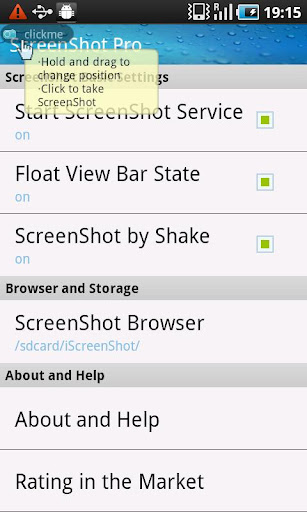
ScreenShot Free is an Android app which is used to take screenshot of your Android phone.


*** Only those ROOTED phones are supported ***
You can take a screenshot by shake or click the bar.
Files can be saved as jpg format in the sdcard.
You can browse it to share or delete.


Features:
1.click bar to take a screenshot
2.shake to take a screenshot
3.Screenshot by notification
4.share your screenshot with your friends via email or facebook,twitter,Instagram,weibo,renren,msn,Flicker,Picasa and so on
4.browse all the screenshot you have captured or snaped on your phone.

You can search these keywords for our apps:
, screenshot , capture ,take photos , camera ,shake , status bar ,share to facebook twitter msn mail weibo renren, free, app2sd , screen shot , screen shot free , screen snap ,snap show , droid

Attention:
Only Rooted phone can use this app.


set permissioins:
- READ_PHONE_STATE
- ACCESS_NETWORK_STATE- INTERNET
- ACCESS_COARSE_LOCATION
- READ_LOGS
: For flurry admob and umeng feedback.- SYSTEM_ALERT_WINDOW: for topmost screenshot button.- WRITE_EXTERNAL_STORAGE: to save the screenshot.

If you don't have root.Please uninstall this app.
Don't say some bad things in the critical.Thank you.


ScreenShot Free apk Videos and Images


Visit us on http://apktoolsdownload.blogspot.com

download


Android Apk
Read More..

Friday, February 12, 2016

Top 4 Twitter Tricks and Hacks 2014

Looking for cool twitter hacks ? In this post I’ll show you top 4 twitter hacks : custom twitter backgrounds, how to do twit of more than 140 characters, how to know who has unfollowed you, automated twitter followers 

1. Custom Twitter Backgrounds

Good background themes really can add charms in your profile. In twitter, you can choose nineteen basic background themes as you have no option to choose rather than them but, it is possible to use and customize backgrounds according to yourchoice. In order to do it, you have to go to www.tweetstyle.com and there, select your desired theme and download it. Now, the next step is to upload it in your twitter account. In this way, you can set your own custom twitter background. You can also go-to Colourlovers.com and can create your own custom theme as all you need to sign in your twitter account in order to set it for twitter. So, in-order to select background theme for your twitter’s profile, you have to go to- Settings- Design Menu.


2. How to do twit of more than 140 characters

Twitter doesn’t allow posting texts more than 140 characters but, it is possible to post texts more that 140 characters by using web-site named- TwitLonger.com. Yes, Twit Longer is an easy way to post long messages to twitter as write what you need at Tweet Longer and Tweet Longer will post the link to twitter for you.


3. How to know who has unfollowed you

In order to know about who has un-followed you in your twitter’s account as for it; you have to go to www.twunfollow.com and there, sign in by your twitter account. Now, the next step is to enter your email-id and then, this service will tell you information about who has un-followed you.


4. Automated Twitter Followers

Yes, now you can get automated twitter’s followers with the help of Free-Followers.com. Free-Followers.com is a unique service that allows you to automatically grow and maintain your Twitter’s Follower base. In Free-Followers.com, you can do-
1. Automatically searches recent tweets and user profiles for people with similar interests.
2. Automatically Follows People with the same interests.
3. Automatically Un-Follows those Twitter users that don’t follow you back, this helps maintain a balance between followers and following.
So, free-followers.com is a great way in-order to increase your twitter followers and manage your twitter account.

Finally, these above twitter features are really interesting to do. I hope you like this page…


Android Apk
Read More..

Thursday, February 11, 2016

Centre mulls 3 billion fund for Muslims education 2014


The Centre on Saturday said it will soon announce a special fund to the tune of $3 billion for uplift of the Muslim people by providing infrastructure, mainly for education.

"We need infrastructure. Indian Muslims need education and for that we need infrastructure. Currently we lack in infrastructure," Union minister for minority affairs K Rahman Khan said here. 


"We are working on to create a fund of $2-3 billion, which will be around Rs 10,000-15,000 crore. Even if only one per cent of Indian Muslims donate, we will be able to generate this amount," Khan said while delivering the keynote address during a function of American Federation of Muslims of India origin.

He said Muslim people in India have the resources but only need the mechanism to generate and manage the fund.

When asked by when the government is likely to finalize the fund, Khan said "We have been working on this for some time. Now we are going to announce it very soon."

He further said the government is taking all necessary steps to improve the conditions of the Muslims.

"The only priority of Indian Muslims is education. If you are educated, the society can be changed ... Do not think that you are a minority, think that you are the second largest population in India," Khan said.

On utilization of funds by the northeastern states, the minister said the Centre had allocated Rs 700 crore for a multi-sectoral development in the region during the 11th Five-Year Plan.

"Utilization of funds here is very slow. We have had discussions with the chief minister. We urge the state governments to give priority and focus more on utilization," he added.


Android Apk
Read More..